⏱️ Do It Now
Create a OneNote Page and copy this into the title:
Lesson 1 - Summer 1 - Introducing Binary
Copy this into a OneNote Page and complete it
|
📝 Do It Now |
|
Topic from which to answer questions Do each of the following:
|
🎯 Learning Objectives
- LO1: Be able to explain why electronic signals are stored as 1s an 0s
- LO2: Be able to describe how computers store denary (human) numbers in binary form
- LO3: Be able to apply knowledge of binary and denary in converting between both number systems
📖 Everybody Reads
🖥️
How Computers Work
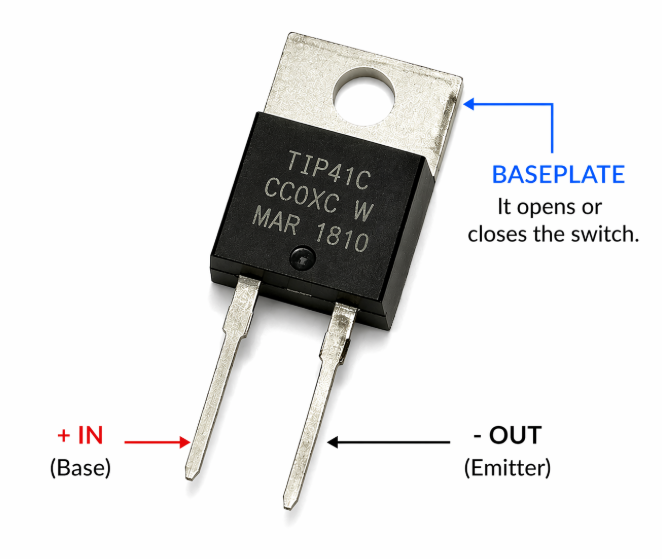
- Computers are made from millions of microscopic switches called Transistors
- All data on computers is stored as 1s and 0s; a system called Binary
Transistors
Transistors are tiny electronic switches that can be switched on by passing an electrical current through their base plate.
Because each transistor can be switched on by an electrical current one transistor can be used to control another. This enables us to create patterns (and ultimately, complex things such as computer software).
Binary
Because switches (such as transistors) can only be on or off, we can only use two values to represent their current state
Computer Scientists decided to represent these two states with 1 and 0
- 1 = ON
- 0 = OFF
📖 Everybody Reads
🔢
How Numbers Are Represented in Binary
- Our system for representing numbers is called denary
- Computers only use two digits: 1 and 0
- Each position in a binary number is called a place value
- We add the place values containing 1 to get the denary number
1s and 0s
The number system used by computers is called binary, which only has two digits:
- 1 = ON
- 0 = OFF
This matches how electronic switches work.
Place Value
Each position in a binary number is called a place value.
Starting from the right, the 1 or 0 in each place value is worth double the previous place value
| Place Values | 8 | 4 | 2 | 1 |
| Binary Number | 1 | 0 | 1 | 0 |
Examples
Remember, we only add the place values that contain 1
Example 1: 0001
| 8 | 4 | 2 | 1 |
| 0 | 0 | 0 | 1 |
= 1
Example 2: 0010
| 8 | 4 | 2 | 1 |
| 0 | 0 | 1 | 0 |
= 2
Example 3: 0101
| 8 | 4 | 2 | 1 |
| 0 | 1 | 0 | 1 |
4 + 1 = 5
Example 4: 1010
| 8 | 4 | 2 | 1 |
| 1 | 0 | 1 | 0 |
8 + 2 = 10
Example 5: 1111
| 8 | 4 | 2 | 1 |
| 1 | 1 | 1 | 1 |
8 + 4 + 2 + 1 = 15
📝 Activity 1
Copy this into your OneNote Page and complete it
|
📝 Activity 1 |
|
Complete each of the following:
|
⌨️ Practical Activity
You will now practice converting denary numbers into binary and vice versa.
Click on This Link
- Complete 10 correctly (you can make some mistakes, but must still have 10 of them correct).
- Click the View Score button to see your results
- Screenshot your results and paste the table into OneNote
- Make sure your give your screenshot a title
Additional Binary Number Challenges
See how high a score you can get with the Cisco Binary Game
Plenary Activity
|
📝 MWB Reflection Task |
|
Open the mini-whiteboard app in a new tab Your teacher will start with these leading questions:
|